Everything You Need to Organize Your Teams
From the first click to a fully organized team, TeamTreck makes structure simple. Name a team, choose a leader, set exactly what they can access, and add the right members—then manage every team from a single dashboard. No spreadsheets, no confusion, just clear teams.

Why Teams Choose TeamTreck for Structure

Guided Team Setup
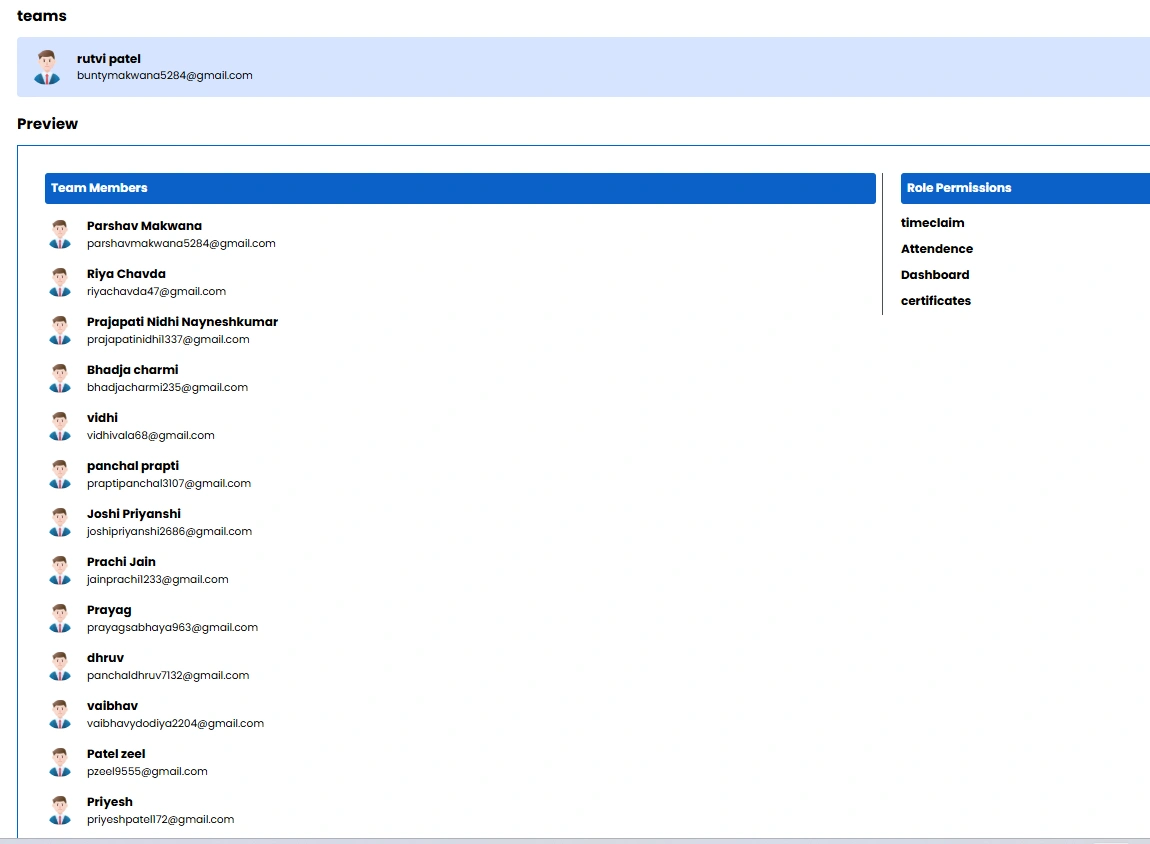
Create a team step by step—name it, pick a leader, set access, and add members—without any guesswork or messy configuration.

Assign a Team Leader
Give every team a clear leader who can manage the group and access exactly the tools they need to keep things moving.

Role-Based Access
Grant each team exactly the permissions it needs, from dashboards and reports to certificates and insights—nothing more.

Manage It All in One Place
See every team, member count, and role at a glance, and edit, view, or update any team in just a few seconds.
Team Setup, Simple From Start to Finish
TeamTreck guides you through building a team from start to finish—naming it, assigning a leader, setting permissions, and adding members. Every step is clear, so your teams are organized correctly the very first time.
Create a Team & Assign a Leader
Start by naming your team and choosing a team leader from your people list. TeamTreck's guided setup walks you through every step, so building a new team takes minutes, not meetings.
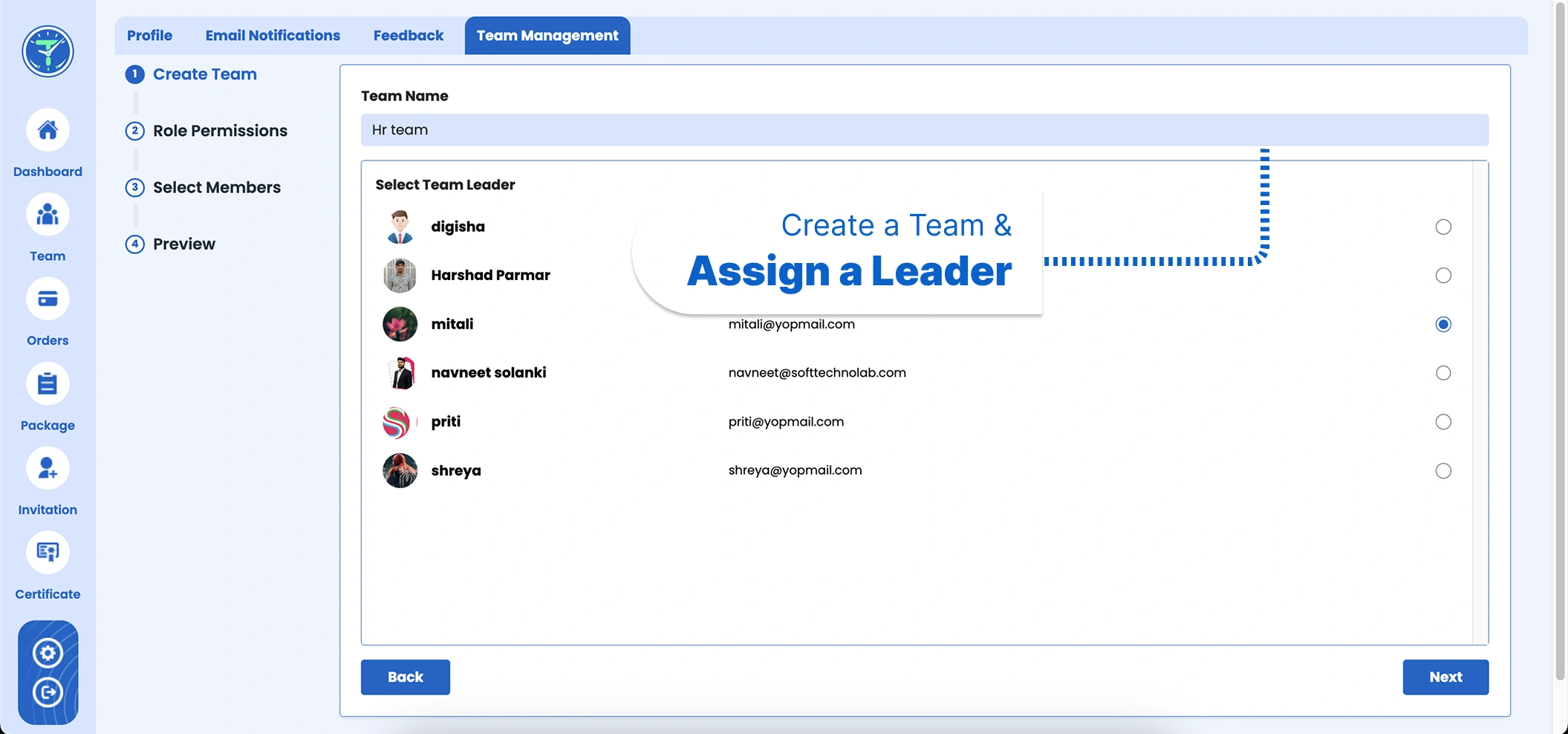
Role-Based Permissions
Decide exactly what each team can see and do. Grant access to modules like dashboards, reports, attendance, certificates, insights, and more with simple checkboxes—so everyone has the right tools and nothing they shouldn't.
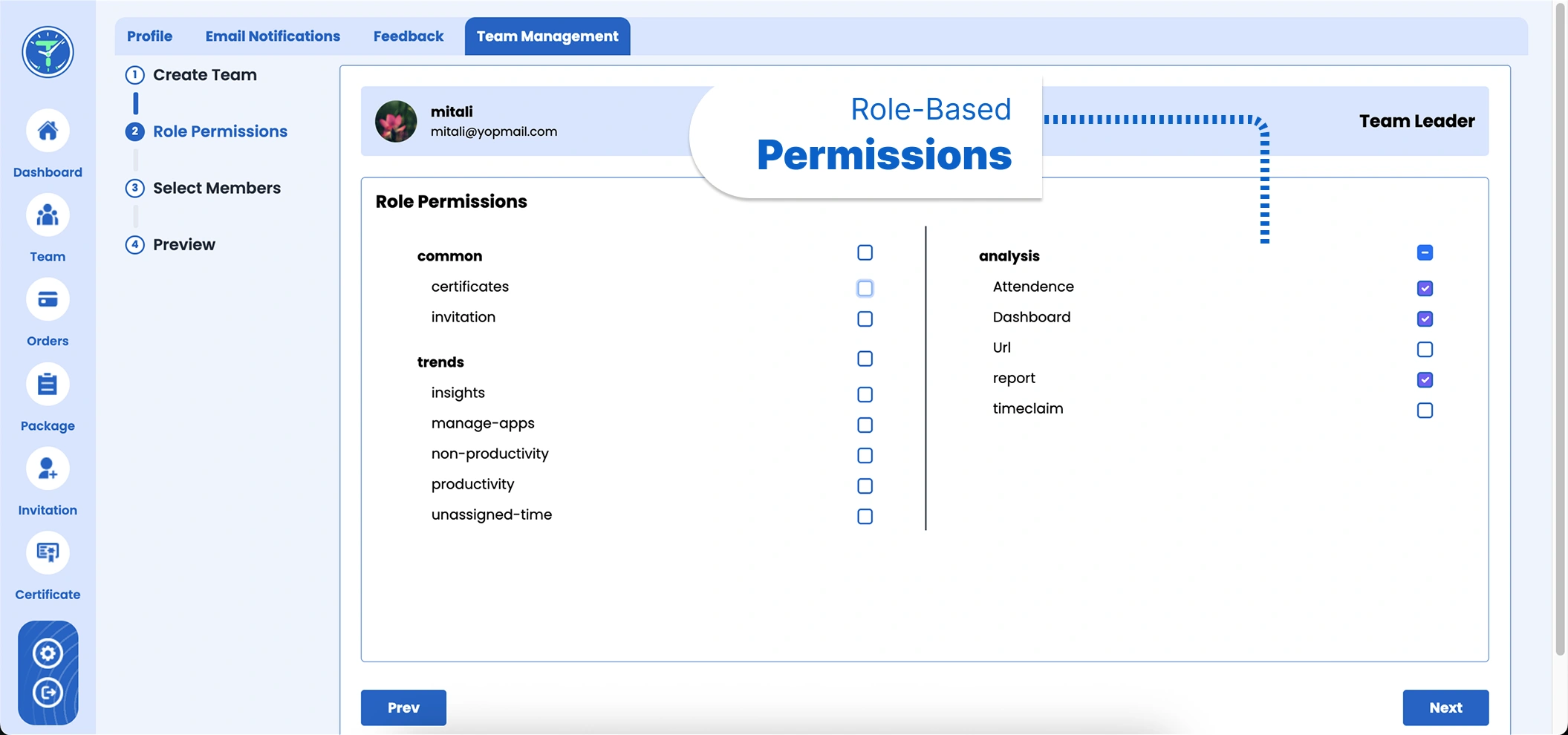
Add Your Team Members
Pick members from your organization and add them to the team in a couple of clicks. Everyone lands in the right group instantly, keeping your structure clean and easy to follow.
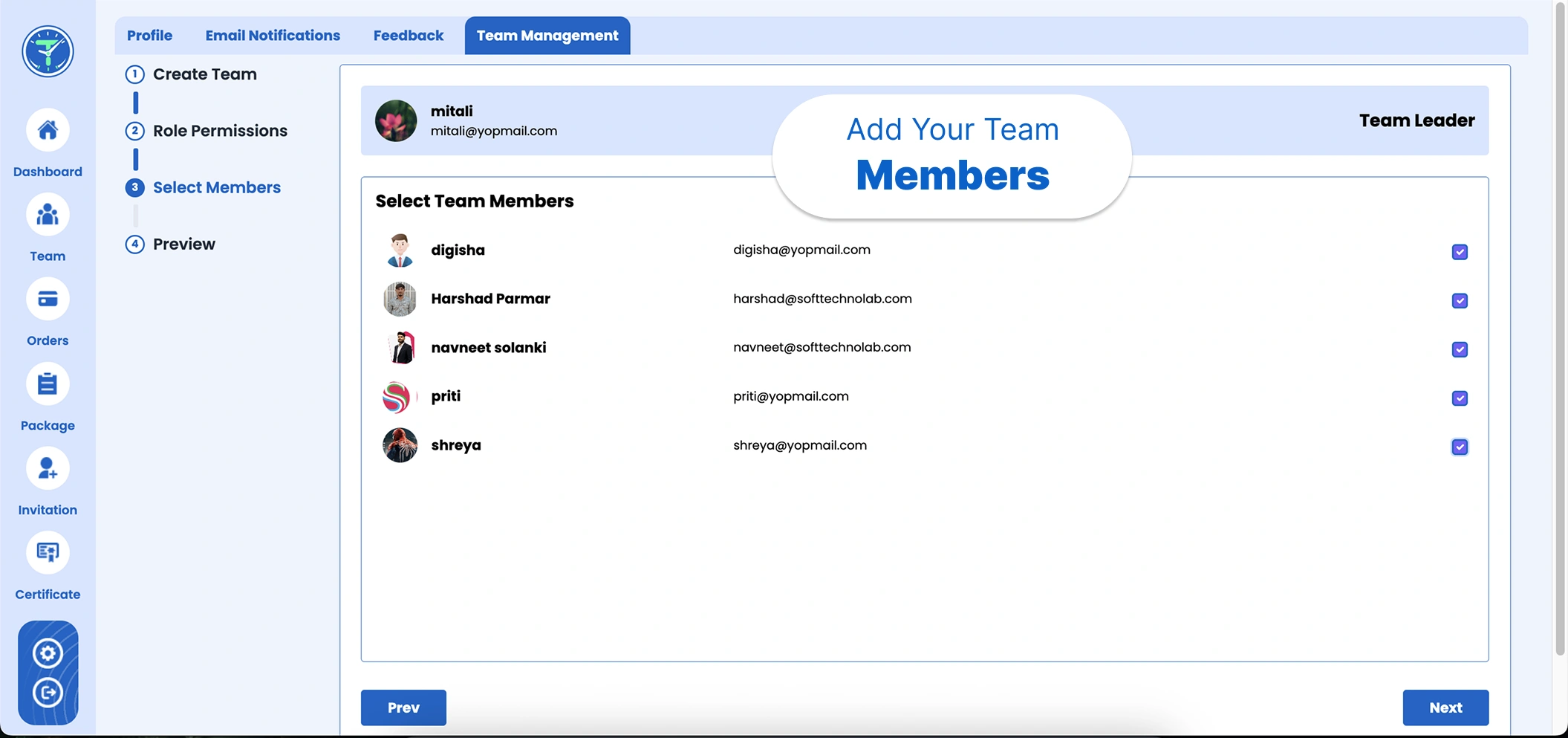
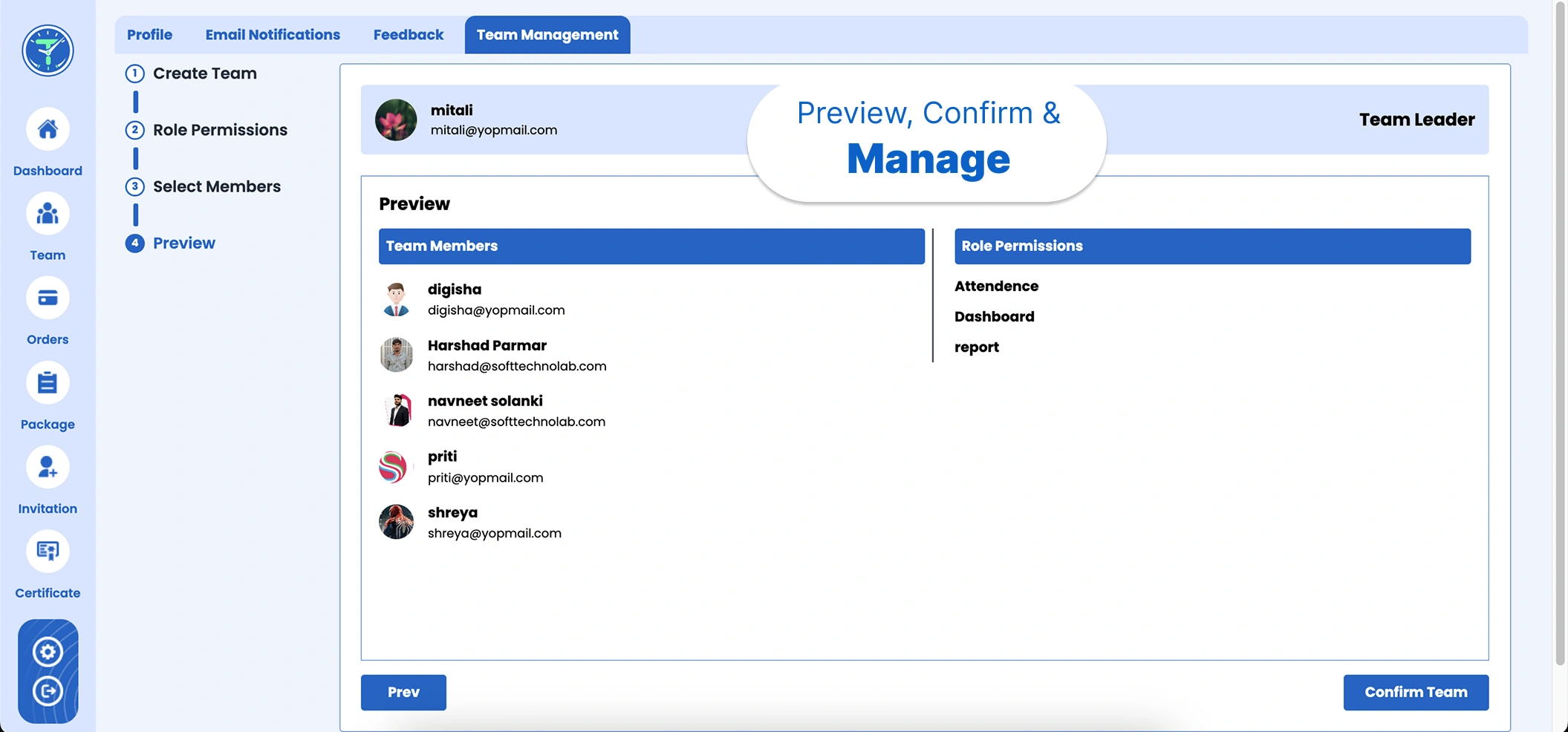
Preview, Confirm & Manage
Review the leader, members, and permissions in one clear summary before you confirm. Once created, every team appears on your dashboard with member counts and quick edit, view, and delete controls.
Testimonials
What Our Users Say
"TeamTreck has made organizing our teams incredibly simple. Creating a team, assigning a leader, and setting permissions used to be a headache—now it's a quick, guided process. Our structure has never been clearer. Highly recommended!"
"The role-based permissions are exactly what we needed. I can give each team leader access to just the right tools and nothing more. Setup is fast, and everything is easy to manage. A must-have for any growing company!"
"What I love is the step-by-step team builder. Naming the team, picking members, setting access—it all flows perfectly. We onboarded several teams in a single afternoon. TeamTreck has saved us so much time!"
"Managing multiple teams is finally effortless. I can see every team, its leader, and member count on one dashboard, and edit anything in seconds. It's clean, intuitive, and my managers picked it up instantly!"
"TeamTreck brought real structure to our organization. Assigning leaders and controlling permissions gives everyone the right access without the risk. The preview step before confirming is a nice touch. I highly recommend it!"
"Since using TeamTreck, building and managing teams takes minutes. The guided setup removes all the guesswork, and the dashboard keeps everything organized. Our whole company is better structured now. Great software!"

Frequently Asked Questions
TeamTreck's Team Management lets you create teams, assign a team leader, grant role-based permissions, add members, and manage every team from one dashboard—giving your organization clear structure and the right access.
What is team management in TeamTreck?
↓
It's a feature for building and organizing your workforce into teams. You can create a team, assign a leader, set role-based permissions, add members, and manage every team from a single dashboard.
How do I create a new team?
↓
Click 'Create Team', give your team a name, and choose a team leader from your people list. TeamTreck's guided steps then let you set permissions, add members, and confirm.
What are role-based permissions?
↓
Role-based permissions control what each team can access—such as dashboards, reports, attendance, certificates, and insights. You grant access with simple checkboxes so everyone has exactly the tools they need.
Can I add members to a team?
↓
Yes. During setup you can select members from your organization and add them to the team in a couple of clicks, keeping your structure clean and organized.
Can I edit a team after creating it?
↓
Yes. Every team appears on your Team Management dashboard with member counts and quick controls to view, edit, or delete the team whenever you need.
Is my team data secure?
↓
Yes. All teams, roles, and permissions are stored securely and are only accessible to authorized admins within your TeamTreck account.
Start Tracking Your Time
With TeamTreck
With TeamTreck