Leave, Holidays, and Notice in One Place
Stop juggling spreadsheets, emails, and calendars. TeamTreck gives your team a single home for requesting and approving leave, setting policies, tracking holidays and weekly offs, managing notice periods, and even celebrating birthdays. Everything HR needs to run time off smoothly, without the back-and-forth.

Why HR Teams Love TeamTreck Leave

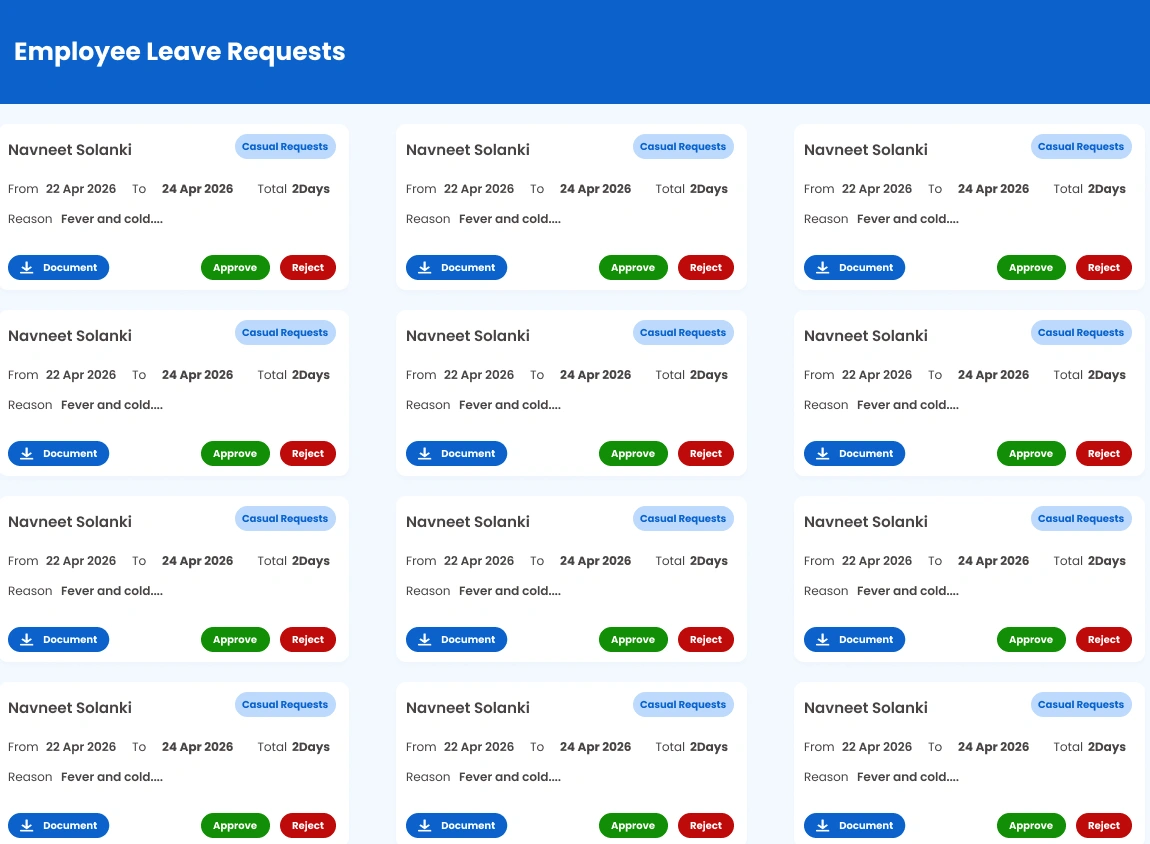
One-Screen Approvals
See every pending and past leave request in one view, then approve or reject with a single tap. No more chasing emails or lost messages.
Policies Your Way
Define leave types, paid or unpaid rules, carry-forward, sandwich rules, and weekly offs so time off follows your company's exact policy.

Holidays & Week-Offs
Maintain a shared company holiday calendar and flexible weekly-off rules, so everyone always knows which days are working days.
Notice & Birthdays
Track notice periods from start to completion and never miss a team birthday—the little things that keep your workplace organized and warm.
Everything You Need to Manage Time Off
From the moment an employee requests a day off to the day their notice period ends, TeamTreck keeps every part of leave management organized, transparent, and effortless for both your team and HR.
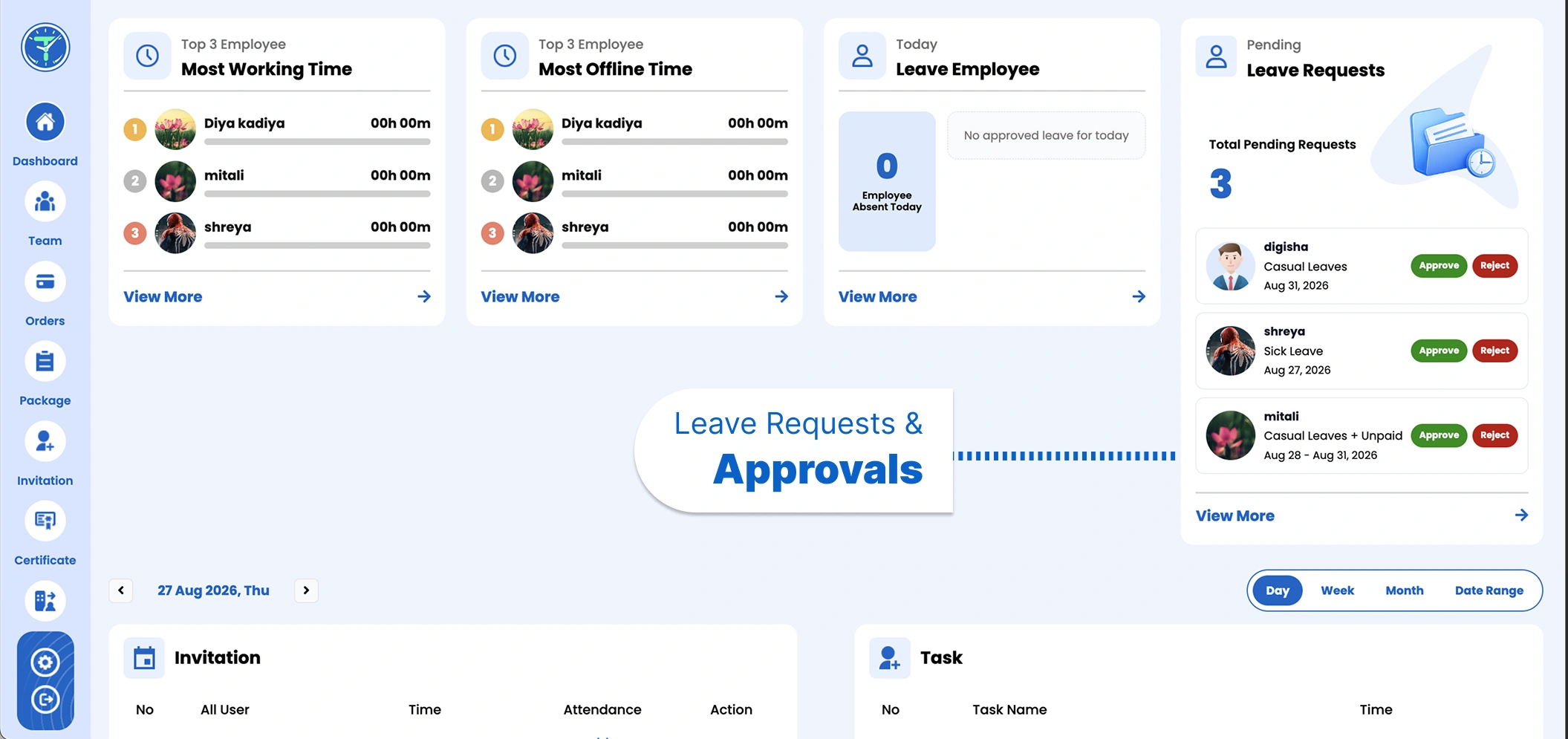
Leave Requests & Approvals
View pending and historical requests side by side, see leave type, dates, and duration at a glance, and approve or reject in one tap. Employees stay informed automatically, and nothing slips through the cracks.
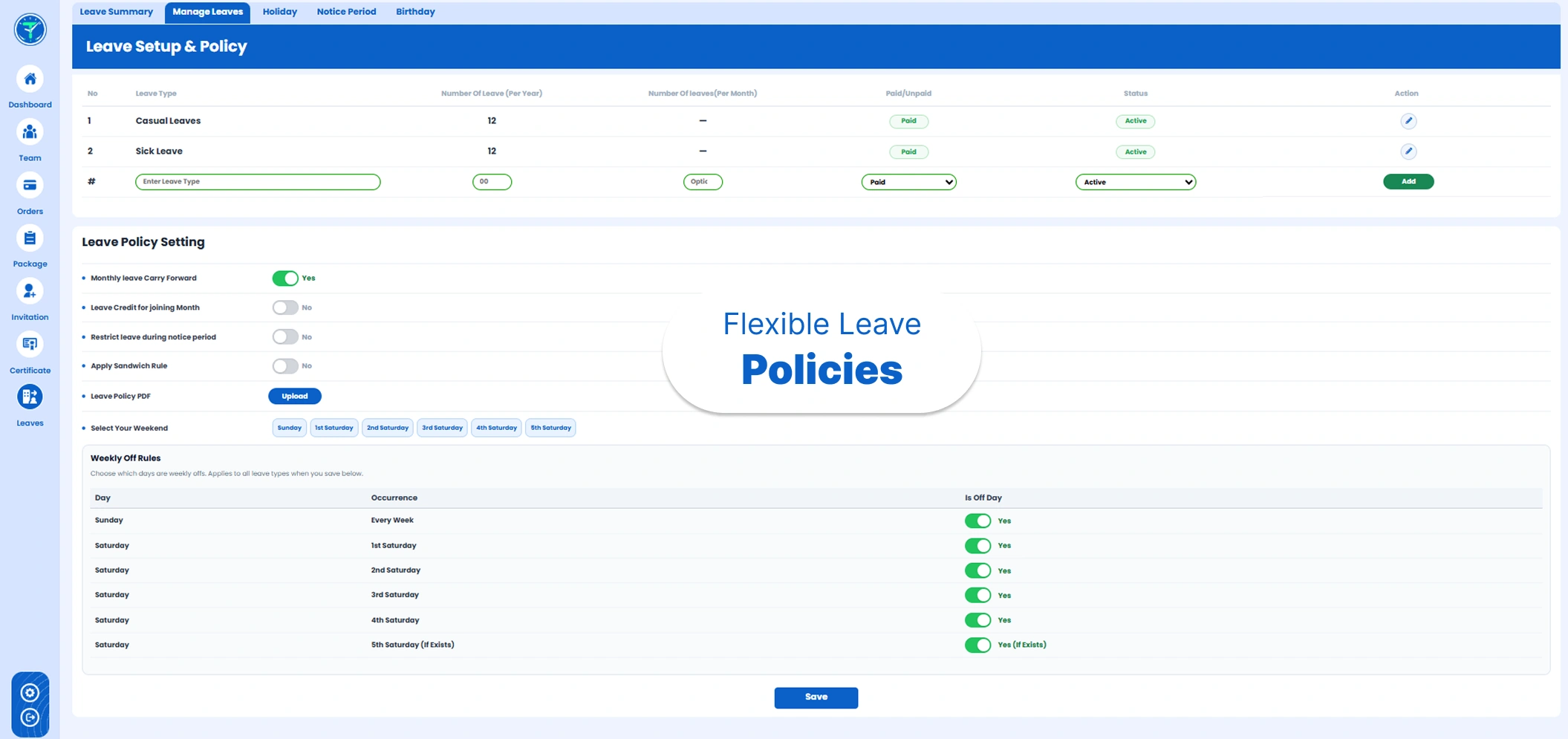
Flexible Leave Policies
Create any leave type—casual, sick, earned, and more—with paid or unpaid rules, yearly and monthly limits, carry-forward, and sandwich rules. Set your weekly offs and upload a policy PDF so everyone follows the same clear guidelines.
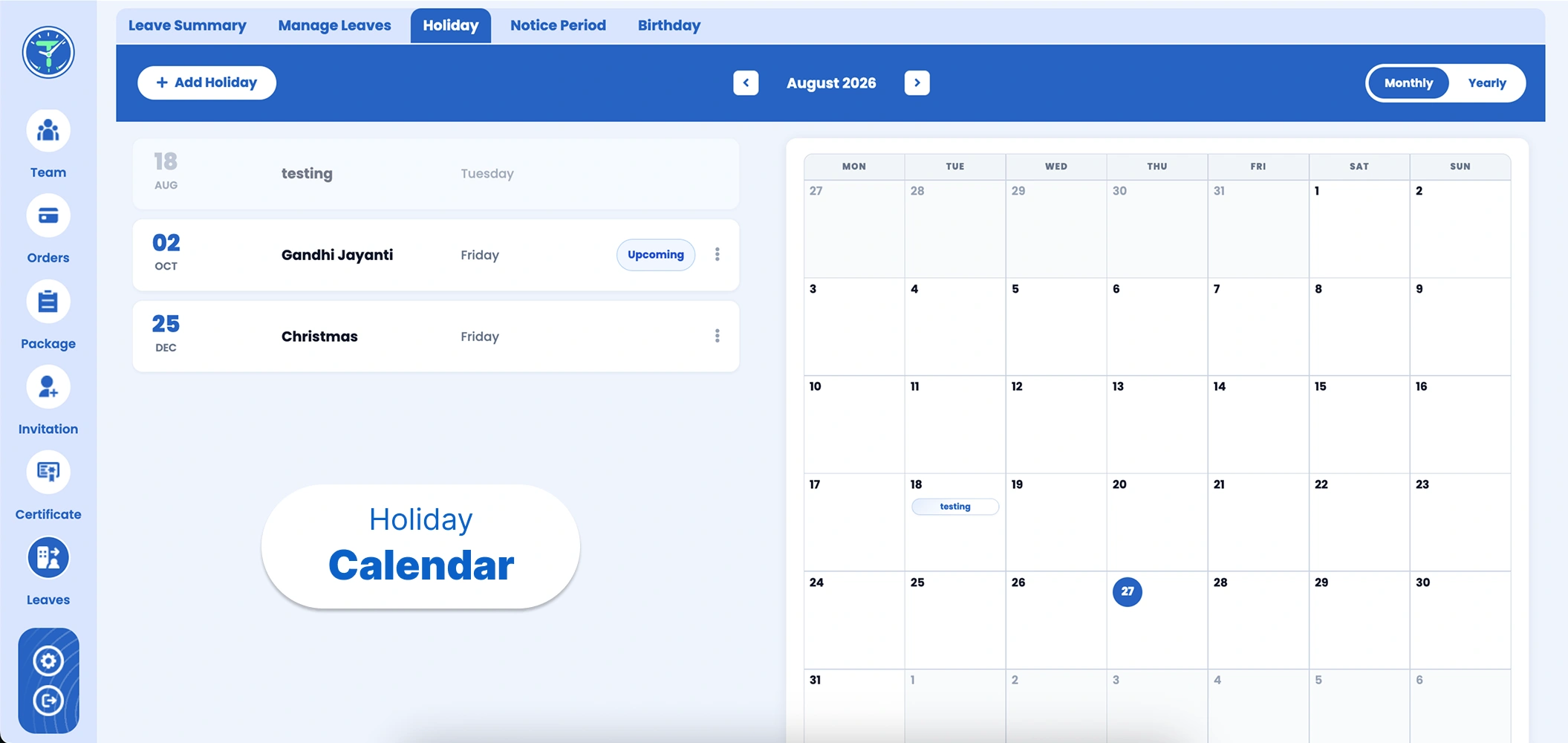
Holiday Calendar
Keep a shared holiday calendar your whole team can see, switch between monthly and yearly views, and add company or regional holidays in seconds. Weekly-off rules keep working days crystal clear all year round.
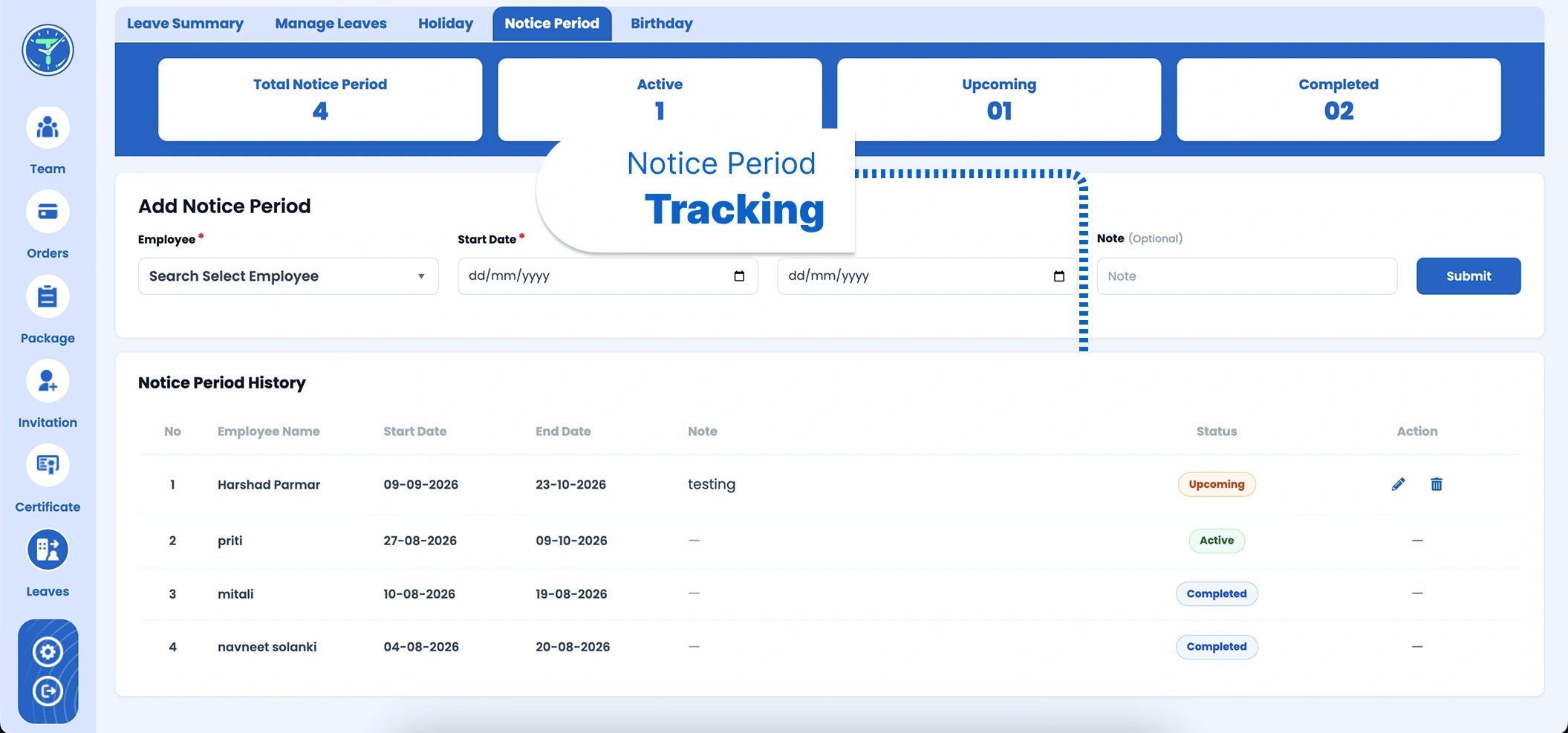
Notice Period Tracking
Add and monitor notice periods with clear statuses—active, upcoming, and completed—so offboarding stays organized. See start and end dates, add notes, and keep a complete history for every departing team member.
Testimonials
What Our Users Say
"TeamTreck has completely streamlined how we handle leave. Approving requests used to take days of back-and-forth—now it's one tap. The whole team can see holidays and balances in one place. Highly recommended!"
"Setting up our leave policy was so easy. Casual, sick, carry-forward, weekly offs—everything is configurable. Our HR process has never been this smooth, and employees love the transparency. A must-have tool!"
"The holiday calendar and notice period tracking are exactly what we needed. Everything about time off now lives in one place, and nothing gets missed. TeamTreck has saved our HR team hours every week!"
"What I love most is how simple leave approvals are. I can see the leave type, dates, and duration instantly and approve on the spot. It's intuitive, clean, and my team picked it up immediately!"
"TeamTreck brought all our leave management into a single dashboard. From requests to notice periods, everything is organized and clear. The birthday reminders are a lovely touch too. I highly recommend it!"
"Since switching to TeamTreck, managing leave has become effortless. Policies, holidays, approvals—it all just works. Our team is more organized than ever, and we've cut so much manual tracking. Great software!"

Frequently Asked Questions
TeamTreck's Leave Management is an HR system for requesting and approving employee leave, setting leave policies, maintaining a holiday calendar, tracking notice periods, and celebrating team birthdays—all from one dashboard.
What is leave management in TeamTreck?
↓
It's a complete HR module for handling employee time off. From one dashboard you can approve leave requests, set leave policies, manage holidays and weekly offs, track notice periods, and see team birthdays.
How do employees request and get leave approved?
↓
Employees submit leave requests that appear in your Pending list. You can see the leave type, dates, and duration, then approve or reject in a single tap—and the employee is updated automatically.
Can I customize leave types and policies?
↓
Yes. You can create any leave type with paid or unpaid rules, set yearly and monthly limits, enable carry-forward or sandwich rules, choose weekly offs, and upload a leave policy PDF.
Does it include a holiday calendar?
↓
Yes. TeamTreck offers a shared holiday calendar with monthly and yearly views, so you can add company or regional holidays and keep working days clear for everyone.
How does notice period tracking work?
↓
You can add a notice period for any employee with start and end dates and notes. TeamTreck tracks each one with active, upcoming, and completed statuses and keeps a full history.
Is my team's leave data secure?
↓
Yes. All leave requests, policies, and records are stored securely and are only accessible to authorized admins within your TeamTreck account.
Start Tracking Your Time
With TeamTreck
With TeamTreck